Wednesday, November 8, 2017

Upgrading to DataConnect from Version 9 to Version 11 --- a better journey.

This was published on the Actian website :  https://www.actian.com/company/blog/upgrading-actian-dataconnect-version-9-version-11-better-journey/

Upgrading to Actian DataConnect 

from Version 9 to Version 11 

--- a better journey.    


I posted an article about a year ago speaking to upgrading from Data Integrator Version 9 to Version 10.  :    Actian DataConnect – The Conversion from v9 to v10 does not have to be scary!!
That article used the v9 or v10 Process object to use a script step to do the magic.  I actually provided code that could be used.
Well now there is the exciting new Actian Data Connect V11.
The first thing I did was look around within the tool.   It looks good, and some what intuitive, especially for previous v9 users.
The next thing I wanted to check out was the import tool.
So first thing I noticed was the file menu had an Import option:


Next it opens a wizard, and I choose to Import a Version 9 Workspace


Press Finish and it does the process to migrate.

Open the V11 workspace and choose what you want.


And I choose :


And it opened this:


And this was the original:


So that is the migration process from V9 to V11.  Much better customer experience than before.

Enjoy.

Coming soon details on migrating from V10 to V11.

Blog articles are Published at:  http://sfcg.com/author/david-byrd/
Other articles: Byrd's Integration Blogs


Check out my other articles :
Actian DataConnect - The Conversion from v9 to v10 does not have to be scary!!
Actian DataConnect Workaround - Working with GMAIL thru the Email Invoker in EZScript
Actian DataConnect Best Practices: Clean up obsolete artifacts before you bring your server down!
Actian DataConnect - Three Reasons Using Actian EZScript Code for sending Emails Should Be On Your Radar

Boomi Integrations: Smart Start for Boomi Extensions for Integrations Connections


Boomi Integrations: Extensions for Connections
by David Byrd

As a data integrator, you spent time putting your Boomi data integration together, and now it is time to move it from your Development environment, to a Test Environment, and then eventually move it into production.  This is how you connect to a On-Premise database, or the Cloud app like Oracle Sales Cloud/Oracle CX .
Step 1 : So the first thing to do is set up the Extensions for the connections.  In the Build tab, Open the process then click on the extension pop-up in the process.


You should now see a pop-up for the Extensions, like below:


Notice we are defaulted to the “Connection Settings” tab.  This article is focused on just the “Connections Settings”. 


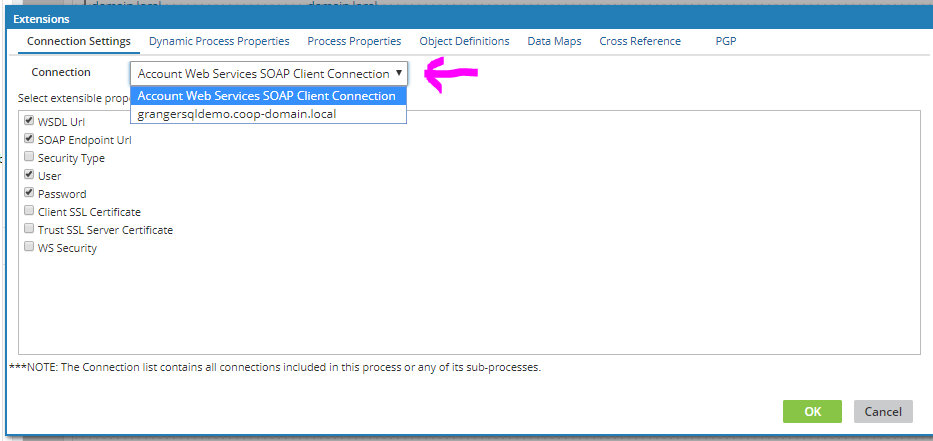
Now if you click the pull-down for Connections, you all the connections available for this process.  Select one and it shows you all the settings you can modify at a later time.  If you want to be able to change the setting, make sure to check the checkbox in front of each setting that will be modifiable.
Now the Process is ready to deploy.  That will be covered in another article.

Step 2 : Set the extensions for the connections for the Environment, so click on the Manage tab.


Next choose your environment to set.


Then Click on Environment Extensions as shown below:


This opens a pop-up


Click on the Pull-down and choose the one of the Connections you want to setup the extensions.


You can then set each of the settings that you choose above, or check the “Use Default” to use the original setting setup in development.


As you can see the steps are easy and straight forward bringing the data integrator and nice customer experience.

And that does it.  Watch for new articles for the other types of Extensions used in a Boomi Process, and How to Deploy a process..

Blog articles are Published at:  http://sfcg.com/author/david-byrd/

Other articles: Byrd's Integration Blogs


Friday, March 10, 2017

Defining a Web-services Parallel processing Controller

The following presentation demonstrates a preferred solution I architected at a former Healthcare company.

The problem :   Too many webservices processing and connecting in an unorganized maner without any controls.   Multiple approaches  to loading efficiently caused the web-services API layer to become over-burdened.

The solution:   Build a webservices parallel load controller.

Please review video.

The last two screens defined costs using a real-time queue thru Data connect.

We did not do that.  Instead we used the SQL Server database to house a message controller, and then built processes in DataConnect executed by a stand-alone engine ( not Integration Manager).   Then windows task scheduler was used to run "X" number of loader jobs or queues.


XML Parsing IN SQL Server

COOL SQLServer code of the week
======================================


Hey Integration Fans....

Cool Code of the week.... so using Pervasive I was trying to parse an XML file like the Sample below. It had 125000 Request segments and was taking 45 minutes to process. I changed to delimited text source like I had done at FirstCare, and did my own parsing and that brought the time down by 10%.

The I tried the SQL code below to parse the XML inside of SQL SERVER... and that brought the parsing down to 125 seconds in 2 passes ( one for each request type). Note the savings was from 2700 seconds to 125, a reduction to 4.6% of the original time.

Enjoy this could be really helpful.

David


Sample XML showing schema....

<ETLWebServiceRequests>
<Request RequestType="CONSUMERTAG">
<assign-consumer-tag>
<tag-short-name>RpLexNex</tag-short-name>
<consumer-agency-identifier>1379376</consumer-agency-identifier>
</assign-consumer-tag>
</Request>
<Request RequestType="AREVENT">
<save-arevent-with-shortnames>
<consumer-agency-identifier>1601904</consumer-agency-identifier>
<action-code-shortname>CNSMSCR</action-code-shortname>
<result-code-shortname>SKPINFO</result-code-shortname>
<message-text>Received New score information from Skiptrace Lexis Nexis</message-text>
</save-arevent-with-shortnames>
</Request>
</ETLWebServiceRequests>


And here is the SQL:
----------------------------------

DECLARE @XML XML;
SELECT @XML = CAST((SELECT * FROM OPENROWSET (BULK '\\wasvpdb005\FileImport\LN_PostProcess\LN_Tag.xml' , SINGLE_BLOB) AS x) AS XML);
SELECT RequestNodes,
CAST( RequestNodes AS NVARCHAR(4000)) RequestNodeTxt,
(
SELECT T.c.value('.','varchar(8)')
FROM RequestNodes.nodes('/assign-consumer-tag/tag-short-name[1]') T(c)
) tag_short_name,
(
SELECT T.c.value('.','int')
FROM RequestNodes.nodes('/assign-consumer-tag/consumer-agency-identifier[1]') T(c)
) consumer_agency_identifier
FROM
(
SELECT T.c.query('.') AS RequestNodes
--, T.c.value('../@RequestType','varchar(50)') AS result
FROM @XML.nodes('/ETLWebServiceRequests/Request/*') T(c)
) RequestNodes

SELECT RequestNodes,
CAST( RequestNodes AS NVARCHAR(4000)) RequestNodeTxt,
(
SELECT T.c.value('.','varchar(8)')
FROM RequestNodes.nodes('/save-arevent-with-shortnames/action-code-shortname[1]') T(c)
) action_code_shortname,
(
SELECT T.c.value('.','varchar(8)')
FROM RequestNodes.nodes('/save-arevent-with-shortnames/message-text[1]') T(c)
) message_text,
(
SELECT T.c.value('.','varchar(8)')
FROM RequestNodes.nodes('/save-arevent-with-shortnames/action-code-shortname[1]') T(c)
) action_code_shortname,
(
SELECT T.c.value('.','int')
FROM RequestNodes.nodes('/save-arevent-with-shortnames/consumer-agency-identifier[1]') T(c)
) consumer_agency_identifier
FROM
(
SELECT T.c.query('.') AS RequestNodes
--, T.c.value('../@RequestType','varchar(50)') AS result
FROM @XML.nodes('/ETLWebServiceRequests/Request/*') T(c)
) RequestNodes
 collapse

Submitting a stored Proc Asynchronously


COOL CODE of the week :
    Careful how you use this.   It is powerful and allows you to start a stored proc(2) within a stored proc(1), and conitnue on in the calling proc(1) even while the called proc(2) is still running.   I am thinking you could build one master stored proc to run the Atlas Queues.     Note:   the very bottom of the calling proc(1)  should have a monitoring piece that watches for the status of the Queued procs to be completed ( and yes the called proc(2) would have to write to a table to say it was done.    When all this occurs, then the calling proc(1) can finish.        

http://www.databasejournal.com/features/mssql/article.php/3427581/Submitting-AStored-Procedure-Asynchronously.htm


Using Webservices in Other Databases

And the Oracle Cloud Equivalent : https://cloud.oracle.com/database

And MYSQL : http://open-bi.blogspot.com/2012/11/call-restful-web-services-from-mysql.html

USING SQL to work with WEBSERVICES in SQL Server

COOL SQLServer code of the week - Part 2
USING SQL to work with WEBSERVICES in SQL Server
======================================
Note: the webservice in this does not give a response back.  Not sure what is wrong with the SQL

Hey Integration Fans....


Below is some pretty powerful code that let’s you execute a call to a web-service from SQL-Server directly.

[dbo].[usp_HTTPRequest] - This stored proc makes the connection to the webservice. It should be enhanced probably to handle retry’s/Timeouts/XL Messages and such. 

The parameters on the execution of this proc allow you to put in the URL where the xml message is being sent, the actual xml message, and the other potentially required information such as methodName , SoapAction , UserName, and Password


David 

CODE:
======================================

USE [Work]
GO
/****** Object: StoredProcedure [dbo].[usp_HTTPRequest] Script Date: 8/14/2014 9:48:17 AM ******/
SET ANSI_NULLS ON
GO
SET QUOTED_IDENTIFIER ON
GO

ALTER proc [dbo].[usp_HTTPRequest] (
@URI varchar(2000) = '', 
@methodName varchar(50) = '',
@requestBody varchar(8000) = '',
@SoapAction varchar(255),
@UserName nvarchar(100), -- Domain\UserName or UserName
@Password nvarchar(100),
@responseText varchar(8000) output )
as
SET NOCOUNT ON
IF @methodName = ''
BEGIN
select FailPoint = 'Method Name must be set'
return
END
set @responseText = 'FAILED'
DECLARE @objectID int
DECLARE @hResult int
DECLARE @source varchar(255), @desc varchar(255)
EXEC @hResult = sp_OACreate 'MSXML2.ServerXMLHTTP', @objectID OUT
IF @hResult <> 0
BEGIN
EXEC sp_OAGetErrorInfo @objectID, @source OUT, @desc OUT
SELECT hResult = convert(varbinary(4), @hResult),
source = @source,
description = @desc,
FailPoint = 'Create failed',
MedthodName = @methodName
goto destroy
return
END
-- open the destination URI with Specified method
EXEC @hResult = sp_OAMethod @objectID, 'open', null, @methodName, @URI, 'false', @UserName, @Password
IF @hResult <> 0
BEGIN
EXEC sp_OAGetErrorInfo @objectID, @source OUT, @desc OUT
SELECT hResult = convert(varbinary(4), @hResult),
source = @source,
description = @desc,
FailPoint = 'Open failed',
MedthodName = @methodName
goto destroy
return
END
-- set request headers
EXEC @hResult = sp_OAMethod @objectID, 'setRequestHeader', null, 'Content-Type', 'text/xml;charset=UTF-8'
IF @hResult <> 0
BEGIN
EXEC sp_OAGetErrorInfo @objectID, @source OUT, @desc OUT
SELECT hResult = convert(varbinary(4), @hResult),
source = @source,
description = @desc,
FailPoint = 'SetRequestHeader failed',
MedthodName = @methodName
goto destroy
return
END
-- set soap action
EXEC @hResult = sp_OAMethod @objectID, 'setRequestHeader', null, 'SOAPAction', @SoapAction
IF @hResult <> 0
BEGIN
EXEC sp_OAGetErrorInfo @objectID, @source OUT, @desc OUT
SELECT hResult = convert(varbinary(4), @hResult),
source = @source,
description = @desc,
FailPoint = 'SetRequestHeader failed',
MedthodName = @methodName
goto destroy
return
END
declare @len int
set @len = len(@requestBody)
EXEC @hResult = sp_OAMethod @objectID, 'setRequestHeader', null, 'Content-Length', @len
IF @hResult <> 0
BEGIN
EXEC sp_OAGetErrorInfo @objectID, @source OUT, @desc OUT
SELECT hResult = convert(varbinary(4), @hResult),
source = @source,
description = @desc,
FailPoint = 'SetRequestHeader failed',
MedthodName = @methodName
goto destroy
return
END
/*
-- if you have headers in a table called RequestHeader you can go through them with this
DECLARE @HeaderKey varchar(500), @HeaderValue varchar(500)
DECLARE RequestHeader CURSOR
LOCAL FAST_FORWARD
FOR
SELECT HeaderKey, HeaderValue
FROM RequestHeaders
WHERE Method = @methodName
OPEN RequestHeader
FETCH NEXT FROM RequestHeader
INTO @HeaderKey, @HeaderValue
WHILE @@FETCH_STATUS = 0
BEGIN
--select @HeaderKey, @HeaderValue, @methodName
EXEC @hResult = sp_OAMethod @objectID, 'setRequestHeader', null, @HeaderKey, @HeaderValue
IF @hResult <> 0
BEGIN
EXEC sp_OAGetErrorInfo @objectID, @source OUT, @desc OUT
SELECT hResult = convert(varbinary(4), @hResult),
source = @source,
description = @desc,
FailPoint = 'SetRequestHeader failed',
MedthodName = @methodName
goto destroy
return
END
FETCH NEXT FROM RequestHeader
INTO @HeaderKey, @HeaderValue
END
CLOSE RequestHeader
DEALLOCATE RequestHeader
*/
-- send the request
EXEC @hResult = sp_OAMethod @objectID, 'send', null, @requestBody
IF @hResult <> 0
BEGIN
EXEC sp_OAGetErrorInfo @objectID, @source OUT, @desc OUT
SELECT hResult = convert(varbinary(4), @hResult),
source = @source,
description = @desc,
FailPoint = 'Send failed',
MedthodName = @methodName
goto destroy
return
END
declare @statusText varchar(1000), @status varchar(1000)
-- Get status text
exec sp_OAGetProperty @objectID, 'StatusText', @statusText out
exec sp_OAGetProperty @objectID, 'Status', @status out
select @status, @statusText, @methodName
-- Get response text
exec sp_OAGetProperty @objectID, 'responseText', @responseText out
IF @hResult <> 0
BEGIN
EXEC sp_OAGetErrorInfo @objectID, @source OUT, @desc OUT
SELECT hResult = convert(varbinary(4), @hResult),
source = @source,
description = @desc,
FailPoint = 'ResponseText failed',
MedthodName = @methodName
goto destroy
return
END
destroy:
exec sp_OADestroy @objectID
SET NOCOUNT OFF