Powerhouse Integrations – Building Actian Integrations that work, so you don't have to!
By David Byrd
Recently I wrote an article that was entitled, “Why Actian DataConnect Goes Head to Head with the Big Boys”.
I thought it might be beneficial to show a use-case for why this is
important. But first my background. I was actually a customer of the
original product when it was called Data Junction back in 1993 at
Certified Vacations, and then in 1998 at Putnam Investments. The product
did the job it was purchased for.
Then in 2003, I actually went to work for Data Junction when I
moved back to Texas. Nine months later the company was purchased by
Pervasive where I worked for another three years. Since then I have
worked at many of their clients including QuickArrow/Netsuite, Toyota,
ADP Total Source, Leprechaun, Deltek, Firstcare, Keta Group, Adaptive
Planning (now Adaptive Insights) and finally SFCG. In the meantime, the
company has been acquired yet again by another company called Actian.
As a developer and data integrator, there are many concepts that are
important when designing a product. Some of these are Repeatable,
Scalable, Stability, Reliability, Usability, and more. I have two great
examples where Data Connect meets this mark.
The first was a project I started at Deltek for a client company
called Keta Group. I built at first about 7 integrations that received
that fed into Deltek Costpoint, or pulled data out of Costpoint and sent
it outbound to a company using Maximus. Ultimately the requirements
were reigned in, and it was decided to use five of the integrations I
built. These were implemented in October 2008 and tweaked the next three
months, and then very minors changes have been made since then. The
great thing about these integrations is that they have been running consistently and reliably
for over 6 years without any maintenance for Keta to require me ( or
someone trained like me) to support them for that period. This speaks
highly for the product in Stability.
Ralph Huybrechts, CFO of the Keta Group, LLC, had this to say, "We
contracted with Deltek, the software supplier, who assigned David Byrd
to write several Pervasive integrations between the prime and
subcontractor’s accounting and timekeeping software and Maximo. David
wrote, tested and finalized these integrations in a 45 day phase-in
period prior to the start of our large base operations support contract
with the Army. This contract requires 350 employees and handles 5,000
service orders per month. The integrations have performed flawlessly
since the start of the contract in 2010. "
The second example I recently spoke about in another article called “Web-Services Best Practice: Using parallel queueing to streamline web-service data loads”
and how it is important. When I was working at Firstcare I designed an
integration that would run Accumulator Webservices messages, as well as
others, that were stored in a database table. These messages were
created by multiple integrations and fed into the table. Here is the
cool part – a single integration picks up these different types of
messages and then sets the connection parameters on the fly from data
stored in the table with the message like the URL endpoint, the user
& password credentials and seamlessly processes the web service call
and stores the response in the table for later processing. That is
this integration connects to multiple Web-Service endpoints without
hardcoding the required parameters in the integration. This speaks
highly for the product in Scalability. In fact, Sandeep Kangala, former EDI Consultant at Firstcare, validated this process is still in effect for Accumulators and running without issue.
But it goes further, the same design concept was taken a step further
at SFCG using Oracle CX endpoints. We initially built a similar
integration to load Oracle Sales Cloud from data provided from exports
from CRM on Demand. However, even with this, we ran into some issues
with CRM On Demand Attachments, especially large ones. The bulk export
out of CRM OnDemand provide all the small file attachments, but not the
large ones. It did though provide their Attachment ID, so we fed these
ids into the database via CRM Attachment Export requests in bulk, and
each attachment was stored in the database response. So in the case not
only was data fed into a web service for loading but also to fetch data
out of a web service, all through this single integration. The best part
of this is that the integration does not care where the XML Message
came from or is going to, it just takes the message, connects, and
sends it, and then stores the response. This is the height of Repeatability.
Chris Fuller-Wigg, Director of Sales Automated Services, stated, "The
efficiency gains we experienced when loading data in parallel is kind
of unreal, almost 10x faster than serial. We found ourselves losing a
whole day for Accounts to load, only to push the button to load Contacts
the following day. Cutting out the wait time and letting the system
process multiple loads at once allows us to load data 1.5 weeks earlier
on average."
Lawrence Chan, Sr Sales Automated Services Consultant, added, "The
value of this solution is not only limited to the incredible
improvements in data migration speed. With one click, we can have your
system's data up to date the day before go live with one click of a
button. With proper planning in place, those late nights getting your
data up to date will be a thing of the past."
The fact the Actian DataConnect can be found to fulfill the meaning of
these terms satisfies the ultimate customer experience. The customer
here is two-fold, the first is the developer being able to define and
build a trusted flexible integration, and the end-customer getting the
data to work the way they want it. This is a win for Actian, a Win for
the Developer and a win for the End-Customer.
Web-Services Best Practice: Using Parallel queueing to streamline Web-service data loads
Wednesday, November 8, 2017

Upgrading to DataConnect from Version 9 to Version 11 --- a better journey.
This was published on the Actian website : https://www.actian.com/company/blog/upgrading-actian-dataconnect-version-9-version-11-better-journey/
I posted an article about a year ago speaking to upgrading from Data Integrator Version 9 to Version 10. : Actian DataConnect – The Conversion from v9 to v10 does not have to be scary!!
That article used the v9 or v10 Process object to use a script step to do the magic. I actually provided code that could be used.
Well now there is the exciting new Actian Data Connect V11.
The first thing I did was look around within the tool. It looks good, and some what intuitive, especially for previous v9 users.
The next thing I wanted to check out was the import tool.
So first thing I noticed was the file menu had an Import option:

Next it opens a wizard, and I choose to Import a Version 9 Workspace

Press Finish and it does the process to migrate.
Open the V11 workspace and choose what you want.

And I choose :

And it opened this:

And this was the original:

So that is the migration process from V9 to V11. Much better customer experience than before.
Enjoy.
Coming soon details on migrating from V10 to V11.
Blog articles are Published at: http://sfcg.com/author/david-
Other articles: Byrd's Integration Blogs
Check out my other articles :
Actian DataConnect - The Conversion from v9 to v10 does not have to be scary!!
Actian DataConnect Workaround - Working with GMAIL thru the Email Invoker in EZScript
Actian DataConnect Best Practices: Clean up obsolete artifacts before you bring your server down!
Actian DataConnect - Three Reasons Using Actian EZScript Code for sending Emails Should Be On Your Radar
 Upgrading to Actian DataConnect
from Version 9 to Version 11
--- a better journey.
I posted an article about a year ago speaking to upgrading from Data Integrator Version 9 to Version 10. : Actian DataConnect – The Conversion from v9 to v10 does not have to be scary!!
That article used the v9 or v10 Process object to use a script step to do the magic. I actually provided code that could be used.
Well now there is the exciting new Actian Data Connect V11.
The first thing I did was look around within the tool. It looks good, and some what intuitive, especially for previous v9 users.
The next thing I wanted to check out was the import tool.
So first thing I noticed was the file menu had an Import option:
Next it opens a wizard, and I choose to Import a Version 9 Workspace
Press Finish and it does the process to migrate.
Open the V11 workspace and choose what you want.
And I choose :
And it opened this:
And this was the original:
So that is the migration process from V9 to V11. Much better customer experience than before.
Enjoy.
Coming soon details on migrating from V10 to V11.
Blog articles are Published at: http://sfcg.com/author/david-
Other articles: Byrd's Integration Blogs
Check out my other articles :
Actian DataConnect - The Conversion from v9 to v10 does not have to be scary!!
Actian DataConnect Workaround - Working with GMAIL thru the Email Invoker in EZScript
Actian DataConnect Best Practices: Clean up obsolete artifacts before you bring your server down!
Actian DataConnect - Three Reasons Using Actian EZScript Code for sending Emails Should Be On Your Radar
Boomi Integrations: Smart Start for Boomi Extensions for Integrations Connections
Boomi Integrations: Extensions for Connections
by David Byrd
As a data integrator, you spent time putting your Boomi data integration together, and now it is time to move it from your Development environment, to a Test Environment, and then eventually move it into production. This is how you connect to a On-Premise database, or the Cloud app like Oracle Sales Cloud/Oracle CX .
Step 1 : So the first thing to do is set up the Extensions for the connections. In the Build tab, Open the process then click on the extension pop-up in the process.

You should now see a pop-up for the Extensions, like below:

Notice we are defaulted to the “Connection Settings” tab.
This article is focused on just the “Connections
Settings”.
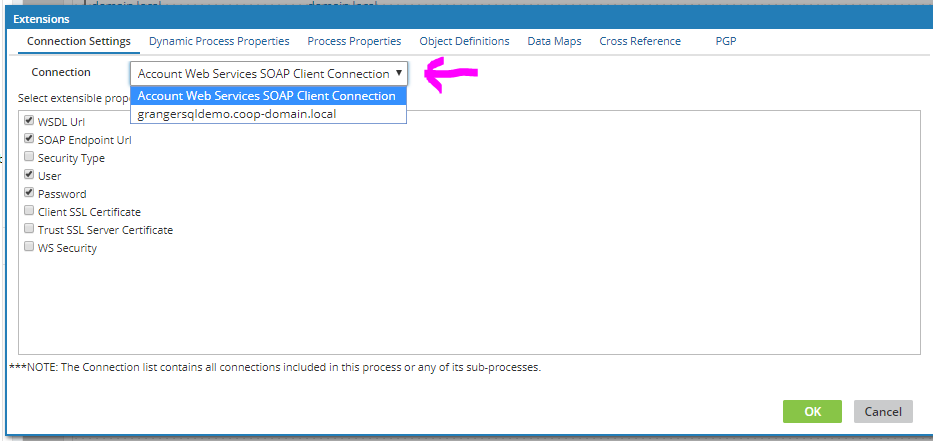
Now the Process is ready to deploy. That will be covered in another article.
Step 2 : Set the extensions for the connections for the
Environment, so click on the Manage tab.

Next choose your environment to set.

Then Click on Environment Extensions as shown below:


Click on the Pull-down and choose the one of the Connections
you want to setup the extensions.


As you can see the steps are easy and straight forward bringing the data integrator and nice customer experience.
And that does it. Watch for new articles for the other types of Extensions used in a Boomi Process, and How to Deploy a process..
Other articles: Byrd's
Integration Blogs
Friday, March 10, 2017
Defining a Web-services Parallel processing Controller
The following presentation demonstrates a preferred solution I architected at a former Healthcare company.
The problem : Too many webservices processing and connecting in an unorganized maner without any controls. Multiple approaches to loading efficiently caused the web-services API layer to become over-burdened.
The solution: Build a webservices parallel load controller.
Please review video.
The last two screens defined costs using a real-time queue thru Data connect.
We did not do that. Instead we used the SQL Server database to house a message controller, and then built processes in DataConnect executed by a stand-alone engine ( not Integration Manager). Then windows task scheduler was used to run "X" number of loader jobs or queues.
XML Parsing IN SQL Server
COOL SQLServer code of the week
======================================
Hey Integration Fans....
Cool Code of the week.... so using Pervasive I was trying to parse an XML file like the Sample below. It had 125000 Request segments and was taking 45 minutes to process. I changed to delimited text source like I had done at FirstCare, and did my own parsing and that brought the time down by 10%.
The I tried the SQL code below to parse the XML inside of SQL SERVER... and that brought the parsing down to 125 seconds in 2 passes ( one for each request type). Note the savings was from 2700 seconds to 125, a reduction to 4.6% of the original time.
Enjoy this could be really helpful.
David
Sample XML showing schema....
<ETLWebServiceRequests>
<Request RequestType="CONSUMERTAG">
<assign-consumer-tag>
<tag-short-name>RpLexNex</tag-short-name>
<consumer-agency-identifier>1379376</consumer-agency-identifier>
</assign-consumer-tag>
</Request>
<Request RequestType="AREVENT">
<save-arevent-with-shortnames>
<consumer-agency-identifier>1601904</consumer-agency-identifier>
<action-code-shortname>CNSMSCR</action-code-shortname>
<result-code-shortname>SKPINFO</result-code-shortname>
<message-text>Received New score information from Skiptrace Lexis Nexis</message-text>
</save-arevent-with-shortnames>
</Request>
</ETLWebServiceRequests>
And here is the SQL:
----------------------------------
DECLARE @XML XML;
SELECT @XML = CAST((SELECT * FROM OPENROWSET (BULK '\\wasvpdb005\FileImport\LN_PostProcess\LN_Tag.xml' , SINGLE_BLOB) AS x) AS XML);
SELECT RequestNodes,
CAST( RequestNodes AS NVARCHAR(4000)) RequestNodeTxt,
(
SELECT T.c.value('.','varchar(8)')
FROM RequestNodes.nodes('/assign-consumer-tag/tag-short-name[1]') T(c)
) tag_short_name,
(
SELECT T.c.value('.','int')
FROM RequestNodes.nodes('/assign-consumer-tag/consumer-agency-identifier[1]') T(c)
) consumer_agency_identifier
FROM
(
SELECT T.c.query('.') AS RequestNodes
--, T.c.value('../@RequestType','varchar(50)') AS result
FROM @XML.nodes('/ETLWebServiceRequests/Request/*') T(c)
) RequestNodes
SELECT RequestNodes,
CAST( RequestNodes AS NVARCHAR(4000)) RequestNodeTxt,
(
SELECT T.c.value('.','varchar(8)')
FROM RequestNodes.nodes('/save-arevent-with-shortnames/action-code-shortname[1]') T(c)
) action_code_shortname,
(
SELECT T.c.value('.','varchar(8)')
FROM RequestNodes.nodes('/save-arevent-with-shortnames/message-text[1]') T(c)
) message_text,
(
SELECT T.c.value('.','varchar(8)')
FROM RequestNodes.nodes('/save-arevent-with-shortnames/action-code-shortname[1]') T(c)
) action_code_shortname,
(
SELECT T.c.value('.','int')
FROM RequestNodes.nodes('/save-arevent-with-shortnames/consumer-agency-identifier[1]') T(c)
) consumer_agency_identifier
FROM
(
SELECT T.c.query('.') AS RequestNodes
--, T.c.value('../@RequestType','varchar(50)') AS result
FROM @XML.nodes('/ETLWebServiceRequests/Request/*') T(c)
) RequestNodes collapse
Submitting a stored Proc Asynchronously
COOL CODE of the week :
Careful how you use this. It is powerful and allows you to start a stored proc(2) within a stored proc(1), and conitnue on in the calling proc(1) even while the called proc(2) is still running. I am thinking you could build one master stored proc to run the Atlas Queues. Note: the very bottom of the calling proc(1) should have a monitoring piece that watches for the status of the Queued procs to be completed ( and yes the called proc(2) would have to write to a table to say it was done. When all this occurs, then the calling proc(1) can finish.
http://www.databasejournal.com/features/mssql/article.php/3427581/Submitting-AStored-Procedure-Asynchronously.htm
Using Webservices in Other Databases
And the Oracle Cloud Equivalent : https://cloud.oracle.com/database
And MYSQL : http://open-bi.blogspot.com/2012/11/call-restful-web-services-from-mysql.html
Subscribe to:
Posts (Atom)